Thursday 10:10AM-2:15PM, Room 1P-231, Fall 2018
Professor Michael Mandiberg
Michael[d0t]Mandiberg[at]csi.cuny.edu
Office Hours: Thursday 2:15-3:15PM (Priority given to those who schedule an appointment via email, or in person during class)
Office: Room 224F, ph 982-2555
Additional Office Hours by appointment on Monday & Wednesday afternoons at the CUNY Graduate Center in Midtown Manhattan (34th & 5th). Email Julie Fuller at jfuller1[A-T]gradcenter[d0t]cuny[d0t]edu if you would like to schedule time.
Course website: 351.00mm.org
Commons Group: commons.gc.cuny.edu/groups/csi-com-351-fall-2018/
Course Description:
From the Handbook
An advanced creative, practical, and theoretical study of digital imaging as it is used in visual communication. Students will enhance their understanding of design and visual practice through thematic digital imaging assignments. Technical topics include advanced features of hardware and software and digital camera use. Theoretical concerns focus on the evolution of digital imagery, digital photography, and representation.
Supplemental
This course will be focused around several interrelated themes. The first two assignments are focused on attribution, appropriation and collections of images. The middle assignments are all about impossibilities, fakes and simulations. The assignment is dedicated to portraiture.
We will use the CUNY Academic Commons extensively to carry on discussions outside of class. While the focus of the course is the production of directed creative work, there are theoretical and historical readings that will help ground your creative work in a context.
Goals and Requirements:
Learning Goals
- Students will develop advanced digital imaging and compositing skills.
- Students will gain intermediate to advanced level aesthetic and compositional skills for digital imaging.
- All student projects will be suitable for inclusion in a student portfolio.
Course Requirements:
- Complete projects on time
- Participate in class discussions, and class critique
- Come to class prepared: do all reading before hand
- Maintain an email account, and browse the web
- Attend field trips
Course Prerequisite:
COM 250 and 251.
Materials and Texts
Review Text: For review of concepts and skills covered in COM 251, please use the textbook you used in that course (e.g. Adobe Photoshop Classroom in a Book). You may also use the Digital Foundations book or wiki.
Further Reading: Martin Evening, Adobe Photoshop CC for Photographers 2018 Edition, Focal Press, ISBN 9781138086760, retail $59.95. You may also use an older 2015, or probably even a CS 6 version.
Materials and Supplies: USB thumb drive (provided)
Laptops: If you are planning on using a laptop, get it connected to the Wireless network.
Disabilities
I seek to provide a comfortable and respectful learning environment for people with disabilities. Please contact me and the Center for Student Accessibility in 1P-101; (718) 982.2510, CSA@csi.cuny.edu as soon as you can to ensure suitable arrangements and a comfortable working environment. The first day of class is ideal, but the please do so within the first two weeks.
Respect for Diversity:
The values of inclusion and respect for diversity are central to the work I do as an educator. The City University of New York's Policy on Equal Opportunity and Non-Discrimination to:
"admit and provide services for students without regard to race, color, creed, national origin, ethnicity, ancestry, religion, age, sex (including pregnancy, childbirth and related conditions), sexual orientation, gender, gender identity, marital status, partnership status, disability, genetic information, alienage, citizenship, military or veteran status, status as a victim of domestic violence/stalking/sex offenses, unemployment status, or any other legally prohibited basis in accordance with federal, state and city laws."
In addition, class rosters and University data systems are provided to instructors with students' legal names and gender identifications. However, knowing that not all students use their legal names or sex/gender assigned at birth, I am happy to use the name and/or pronouns you use. We will take time during our first class together to do introductions, at which point you can share with all members of our learning community what name and pronouns you use. Additionally, if these change at any point during the semester, please let me know and we can develop a way to share this informaiton with others in a way that is comfortable and safe for you.
Lab Policy:
- Turn your phone off. Each and every use of phone or non-class related electronic communication during class will result in a 1 point grade reduction.
- No food allowed in class or lab at any time. You can have water in closed containers that you keep on the floor or in your bag.
- No private software is to be brought to lab or loaded onto school computers.
- No games are allowed in lab.
- You may only listen to music during work periods if you use headphones.
- Do not even think about listening to music during lecture/critique, you will be asked to leave the class (seriously, this has happend before!).
Please be aware that technological failures such as printer errors, erased drives, email issues, computer crashes, network failure, viruses, etc. are not emergencies, they are facts of life. You must structure your workflow in anticipation of such scenarios. Backup, backup, backup! You have been warned. ;-)
Email Policy
Please consult the syllabus and/or the related assignment before posing questions that may already be addressed there (i.e. due dates, scope, deliverable, etc). I will not reply to email inquiries regarding course matters (assignment requirements, due dates, exam structure, readings, etc.) that arise from missing class (e.g. "I couldn't make it to class today, can you tell me what we covered?") or inattention to the course syllabus. I will respond to inquiries requesting clarification , though I would strongly prefer these inquiries to be made on the group site, in class or during office hours.
If your question will take more than two minutes or two sentences to answer, it's not a question, it's a discussion topic. Please bring the topic up in class, or I would be happy to discuss it with you during my office hours.
Emails will not be answered immediately or in the depth that they would in-person. Consequently, they are not the most productive way to communicate with me for matters that require more than a sentence or two to resolve.
Read this post on Design Educator for more on writing a good email
Grading Criteria:
We will be covering a great deal of information at a fast pace, so attendance is a strong determinant of your grade: without attending you will not have the knowledge necessary to successfully complete your assignments, as you will have missed thematic and technical lectures, as well as the presentation of class assignments. Furthermore, College of Staten Island Attendance Policy states that after more than 8 hours of absence (15 percent of the course meeting time) you will be assigned a WU (withdrew unofficially).
Repeated tardiness will be cause for grade reduction: first tardiness is excused, all others result in a 1 point deduction. Perfect attendance will be rewarded with 3 extra credit points. If you know that you will be absent on a date that a project is due, you may submit your work before the deadline or arrange to have another student submit work for you.
Projects are due on the assigned date, at the beginning of class. NO EXCEPTIONS. Each day it is late your grade will be reduced one incremental letter grade. Assignments will not be accepted after one week from the date due without prior approval from the professor.
Every assignment you turn in can be revised based off of the feedback provided during critique. If you choose to revise any of your projects, you must do so by the date indicated in the syllabus. Finished projects turned in on time will be assigned the grade for the revised project; projects that were incomplete at the original due date will be assigned an average of the two grades.
Scale:
Online & Offline Participation 10 points
Flickr to Wikipedia 5 points
Out of place 10 points
Impossible Spaces 10 points
Collage Portrait 10 points
App Interfaces 10 points
Perfection 10 points
Accumulated History Paintings 15 points
Final project 20 points
Academic Integrity, Plagiarism, and Cheating
Integrity is fundamental to the academic enterprise. It is violated by such acts as borrowing or purchasing assignments (including but not limited to term papers, essays, and reports) and other written assignments, using concealed notes or crib sheets during examinations, copying the work of others and submitting it as one’s own, and misappropriating the knowledge of others. The sources from which one derives one’s ideas, statements, terms, and data, including Internet sources, must be fully and specifically acknowledged in the appropriate form; failure to do so, intentionally or unintentionally, constitutes plagiarism.
Violations of academic integrity will result in failure for an assignment or failure in a course and in disciplinary actions with penalties such as suspension or dismissal from the College. More information on the CUNY policies on Academic Integrity can be found here.
Project Summaries
Assignment 1: Flickr to Wikipedia (5 points):
You will find an appropriately Creative Commons licensed image on Flickr and import it into Wikimedia Commons, and place it onto at least one Wikipedia Page for which it could illustrate.
Assignment 2: Out of Place (10 points)
Put a figure into a scene from a different time or place.
Assignment 3: Impossible Spaces (10 points)
Using photomerge with an understanding of architectural perspective correction, we will photograph and composite one large expansive image of many photographs of one large space.
Assignment 4: Collage Portrait (10 points)
Create an animated collage portrait of someone
Assignment 5: App Interfaces (10 points)
Redesign a website, or app interface
Assignment 6: Digital Painting / Digital Perfection (10 points)
Retouch a family photo into magazine-cover-ready perfection. Or create a digital painting based off an image. In particular, choose an image whose roughness defines its contextual/historical place, and remove that roughness via retouching and recoloring.
Assignment 7: Accumulated History Paintings (15 points)
Keeping in mind the history of collage, constructivism, collage, and political protest, you will create a large (16 x 20 inch) collage. This college will achieve its effect via the accumulation of many many parts which you will composite together. We will print this at full size on the large format printer.
Final Project: Symbolic Portraits (OR) Wikipedia Illustrated (20 points)
You will create a prtrait of someone that combines all of the technical skills and thematic strategies we have learned. OR You will create illustrations for Wikipedia.
Extra Credit
I will be announcing events/exhibitions/performances/etc in Manhattan throughout the semester. I will award 2 points extra credit for attendance at these events. You will prove to me that you went by turning in your ticket stub or collecting a press release AND writing a one paragraph review of the event/show. I will give up to 8 points extra credit for this. Also included in this category is attendance at any one of the following museums: MOMA (you get in free), MOMA film (you get in free with your CUNY ID), PS1, The New Museum, The Metropolitan Museum, The Whitney, The Guggenheim, The Cooper Hewitt, The Museum of Arts and Design, or any other major art museum. For those in two of my classes, please note that an individual event/museum can only be 'applied' to your grade in one of these two classes.
Course Outline (Subject to Revision)
Week 1. August 30
Thematic introduction to the course: Fakes, Simulations, Forgeries and Impossibilities
Non-graded class assessment/placement exam, and pre-evaluation. Use this file.

Technical Review Part 1: Resolution, file size, resizing, non destructive editing
Discussion and assignment of first project: Flickr to Wikipedia; Images online: searching and sampling
Homework: Project 1, Flickr to Wikipedia
Reading: Digital Foundations Chapter 2, Searching and Sampling http://wiki.digital-foundations.net/index.php?title=Chapter_2_CS6
Review Reading: Digital Foundations or Photoshop CIB on resolution, masks, adjustment layers, Bridge, cropping, file formats and save for web
Week 2. September 6
Due: Project 1
In class: Photo Demo, with 3 point lighting, and head shots.
Technical Review Part 2: Bridge, file formats, save for web, cropping, masking, using a digital camera
Tech Demo: Camera Raw. Demo here or here. Masking.
Homework: Project 2
Reading: Benjamin, The Work of Art in the Age of Mechanical Reproduction or as a PDF here
Watching: Photomerge for a panorama with content aware, Photomerge with lens correction (first 6 minutes, as it gets a little geeky after minute six), Clone tool,
Optional Reading: Photoshop for Photographers Chapter 7, Image Retouching (Cloning, and Patch Tool), (Vanishing Point); Chapter 8 (Photomerge), Lens Correction
Week 3. September 13
Due: Project 2
Critique: Project 2
Lecture: Principles of photography and image composition
Tech Demo: Photomerge. Perspective correction, Free transformation
Reading: Benjamin, The Work of Art in the Age of Mechanical Reproduction or as a PDF here
Homework: Project 3, Impossible Spaces
Watching: Shadows
Week 4. September 20
Due: Project 3, Impossible Spaces
Critique: Project 3
Discussion: Benjamin, The Work of Art in the Age of Mechanical Reproduction or as a PDF here
Lecture: still lifes and iconography
Demo: Creating realistic shadows
Homework: Project 4, Still Lifes
Reading: Lauren Collins, Pixel Perfect: Pascal Dangin’s virtual reality, New Yorker, and The Headless Women of Hollywood.
Week 5. September 27
Due: Project 4, Still Lifes
Discussion: images, bodies, and body image.
Reading: Demos on Select > Color Range. The conventional one. The one from "You Suck At Photoshop" (more on that here). Hair Selections
Reading: For more on quick masks, please see chapter 10 of Digital Foundations. and Chapter 11 of Digital Foundations.
Tech Demo: UI layout with Photoshop.
Homework: begin work on Project 5, UI design
Reading: Demos on Skin Selection and Masking, Glamour Skin Glow, Glamour Portraits
Week 6. October 4
Due: Project 5, and revisions to projects 1-3
Tech Demo: Retouching I: Hiding blemishes. We will use your headshots from our photoshoot
Homework: Finish Project 6
Reading: Ashley Graham, Unfiltered, The New York Times, Sept 5 2018. View the AR version of the article on an iPhone or iPad using the NYTimes app. To view on the app, open the camera on your device and point to the QR code on the left.
Week 7. October 11
Due: Project 6, Perfection
Tech Demo: Compositing workshop, Blend Modes, Sitting things down with shadows, color adjustments for compositing
Homework: Begin work on Project 7, Accumulation
Reading: Susan Sontag, In Plato's Cave (from On Photography) -- note, link takes you to Blackboard site, where it is in the "Content"
Reading: reading on History of Dada collage TBD
Week 8. October 18
Tech Demo: Camera RAW redux
Due: Project 7 Creative Brief
Discussion, Sontag
Homework: start Project 7, History paintings
Reading: liquify for plastic surgery, Liquify Freeze Mask
Week 9. October 25
Due: Project 7, rough drafts
Tech Demo: Printing Large, color profiles
Homework: Finish Project 7
Reading: “Puppet Masters” a Dialogue between Kenneth Tinkin Hung and Cliff Evans
Week 10. November 1
Due: Project 7 History paintings
Critique: Project 7 History paintings
Discussion: Sontag and Puppet Masters
Assigned: Final project
Homework: revisions to Projects 4-6.
Lecture: Final Project Assigned
Reading: TBD
Homework: work on Final Project
Week 11. November 8
Due: Creative Brief for final project
Due: Project 7 Accumulation revisions, any further revisions to projects 4-6
Critique: discussion of briefs
Workperiod
Homework: work on Final Project
Week 12. November 15
Group Critiqe for Project 7
Final Project Assigned
NO CLASS, November 22th (Thanksgiving)
Week 13. November 29
Due: two versions of roughs for final
Desk Critique: roughs
Homework: finished draft of Final Project
Week 14. December 6
Due: finished version of final
Desk/Critique: finished drafts
Final Period. December 13
Due: Final Project and revisions on 7
Projects
Assignment 1: Flickr to Wikipedia (5 points):
You will find an appropriately Creative Commons licensed image on Flickr (CC BY or CC BY-SA) and import it into Wikimedia Commons, and place it onto at least one Wikipedia Page for which it could help illustrate. Choose a subject in the field of design, digital media, and new media art OR Staten Island history and geography. For example, you could find a photograph of Lynn Hershman Leeson or her work on Flickr, and add it to the Wikimedia Commons, and then include that on her Wikipedia page; or you could add photographs of the CSI campus to the page about CSI. Except, because this is the demonstration example, you can't use John Maeda or CSI, but you can start by looking at one of these lists of new media artists, contemporary artists, designers, fashion designers. You will have to do a significant amount of research for this project, many of these will be dead ends, but this is part of the research process.
By the end of this project you should be able to:
- Understand Creative Commons license types, and their relationship to Free Culture
- Understand Fair Use, its relationship to freedom of speech, and why images reliant on Fair Use are allowed on the English Wikipedia, but not other Wikipedia sites, nor on Wikimedia Commons.
- Have a user account on Wikipedia and Wikimedia Commons
- Be able to upload images to Wikimedia Commons from Flickr
- Be able to make basic edits to Wikipedia using BBCode
Procedure
1. Learn a little bit about Free Culture:
- What are the four fundamental freedoms?
- What is a Creative Commons license, and what do the BY, SA, NC, and ND clauses mean?
- What does "freely licensed" mean?
- Why is Wikipedia CC BY-SA licenced, and why does this mean that only CC BY and CC BY-SA licensed images can be included?
- What is Fair Use, and why are images that rely on this exemption to copyright law not allowed on some localizations of Wikipedia, but not on Wikimedia Commons?
2. Find a freely licensed image
- Refer to the Finding images tutorial
- Use the Free Image Search Tool (be sure to unselect Wikimedia Commons as an image source) or the CC BY or CC BY-SA search functions on Flickr. Or you can do an advanced search on Flickr, where you specify the CC license.
- Use Wikipedia's lists of new media artists, contemporary artists, designers, fashion designers or the pages about Staten Island as a starting point for your searches.
- Check to see if those images are already on the Wikimedia Commons
3. Move that image from Flickr (or another source) to the Wikimedia Commons
- Upload an image to the Commons using the Flickr to Commons tool.
- Before you start, please authorize the app here and sign in to the Commons.
- Be sure to use the photo's Flickr ID, which is the long number in the URL
- First step: add Flickr ID number, and click "Run" (the image should show up below in a blue area)
- Second step: Add to the description and categories, as needed, and click "Transfer selected files to the Commons"
- If it worked, the image area below will turn green. If the area below is red there was an error (likely that you are not signed in, or didn't authorize the app.)
- Follow the link at the bottom to the image on the commons.
4. Add that image to at least one Wikipedia page
- For reference see the official Wikipedia tutorial, the page edit guide and the image editing tutorial.
- Review the Art+Feminism tutorials and Practice first on the Sandbox
- Your BBCode will look something like this:
[[Image:filename.jpg|thumb|alt=hover text|caption including [[links]].]]
5. Post these links to the forum:
- Source image (on Flickr)
- Image on Wikimedia Commons
- Image on the Wikipedia page
6. Watch that page on Wikipedia and on Wikimedia Commons. To watch the page, click the star at the top right. More on watching pages here.
7. Return to the page and image in a six hours and again after a week, and note any changes.
8. Return to the page periodically during the class, and again at the end of the class. At the end of class you can write a short description of any events that happened to the image or the page during this time which will be considered for extra credit. These may include the removal of your image from the WP page or the WMC entirely, the inclusion of your image on other WP pages, or edits to your image or the text caption.
Assignment 2: Out of place (10 points)
Put a figure into a scene from a different time and place.
Take an image of a person, remove the background from that image. The image of the person you can include their whole body, or just their face, or anything in between. Find a Image in which you can put that figure. You may make one of these two photographs yourself, but not both; at least one of them needs to be found.
You should think about what kind of meaning it's made by the combination of the two. Are you crossing time and space? Are you creating contrast between black-and-white and color? What kind of story are you telling? Is the person or scene instantly recognizable or personal/obscure? How does your viewer decode the meaning you have encoded into the image?
Some ground rules: the personal and scene cannot be fictional (e.g. film or comic) nor can they be a sports figure. Your images should either be appropriately CC licensed, or constitute fair use.
Please create a blog post which includes a jpg with the longest dimension at 1000px. Bring your PSD to class.
Technical resources
For demos on Select > Color Range see: The conventional one or the one from "You Suck At Photoshop" (more on that here). For more on quick masks, please see chapter 10 of Digital Foundations. and Chapter 11 of Digital Foundations.
Assignment 3: Impossible Spaces (10 points)
Use Photomerge to create a composite image of an interior space that shows you more than the eye can see. Be sure to think carefully about what location you choose: you want a space that has interesting detail. Please, no images from your home. You should be sure to make the necessary adjustments to the layer masks, and add missing information via content aware fill.
Please upload a small (1000-2000px) version to the forum, and bring your PSD to class.
Assignment 4: Collage Portrait (10 points)
Create a collage portrait of somebody you know. Use the iconography of medieval/Byzantine icon paintings as a structure and inspiration. Use botanical imagery, or other floral patterning. Please try to create an animation as part of your icon. Create your image sized for Instagram, and export as a gif.
Assignment 5: App Interfaces(10 points)
Redesign a website, or app interface
Make an iPad interface for a local nonprofit or community organization. Following the iPad tutorial, use Photoshop to lay out an interface for an organization. You will need to select a color scheme and find image and logo assets that match the aesthetics of your organization's mission. Your challenge here is to follow the guidelines of the exercise precisely. This is a challenge about measurement, guidelines, rulers, and layer/folder management. Please turn in a JPEG, and bring your PSD’s to class.
Assignment 6: Digital Painting / Digital Perfection (10 points)
Retouch a family photo into magazine-cover-ready perfection. In particular, choose an image whose roughness defines its contextual/historical place, and remove that roughness via retouching and recoloring.
You will use all of the retouching tricks you have learned, in order to make the image more "perfect" than reality. You will use the following: spot healing brush, healing brush, color correction and enhancement, hue/saturation, blend modes, liquify. The most sophisticated, and labor intensive approach is via frequency separation. The fast and dirty approach is to use a surface blur. The Facial Scrub and Foundation Makeup tutorials may be useful. You will want to use the techniques described in the "glamour glow" tutorial and the corresponding skin selection tutorial, as well as eye color adjustment techniques. The 1940s black and white portrait tutorial could be useful, if only for its pseudo-depth-of-field trick from the blurred background.
You may also choose to pursue this as a digital painting project, and create a painting based off of a photograph. Everything about the assignment stays the same in terms of concept and deliverable, you just will be using a different set of techniques. You might turn to this illustration focused painting tutorial, this one which is oil painting like, or one which is slightly more fantastical.
Print the image at the same dimensions as the original image, with the original image set side by side in a "before and after" format. Upload a 1000px wide jpg to blackboard.
Assignment 7: Accumulated History Paintings (15 points)
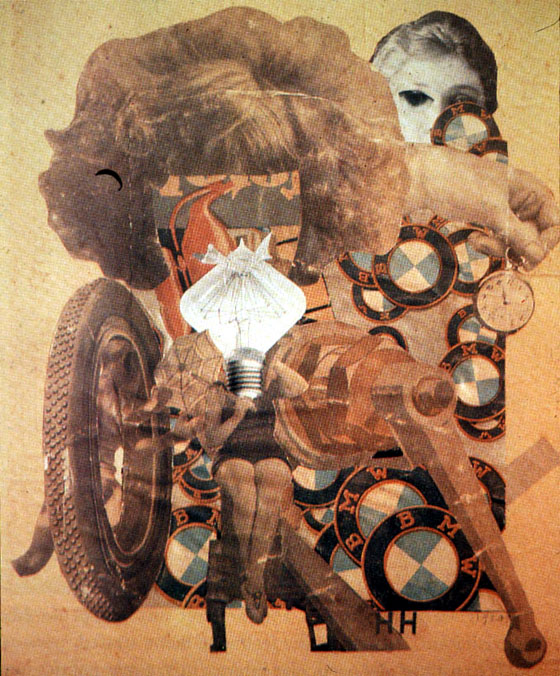
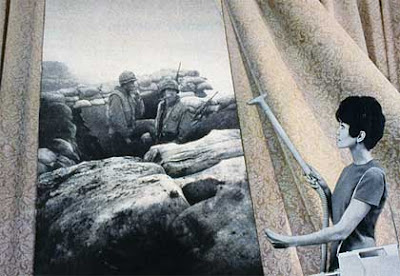
Keeping in mind the history of collage, constructivism, collage, and political protest, you will create a large (16 x 20 inch) collage. Your theme for this project is open, under the general category of fakes, forgeries, and lies.
This college will achieve its effect via the accumulation of many many parts which you will composite together. We will print this at full size on the large format printer.
You will make a creative brief, with a description of the work, what it aims to achieve, with a sketch and sample images. Take Ryan Trecartin's brief as an example to work from. Your creative brief, with all of your source images is due next week. A draft composition is due the following week, uploaded to blackboard at 1200px wide and placed on the instructor machine as a full resolution.psd. The following week the final prints are due.
Some of the visual references to improvise upon include:
Dada / Hannah Hoch (Image 1, Image 2)



The Beatles, St. Pepper's album cover art

Martha Rosler (Image 1 and Image 2 from Vietnam War era, Image 3 from 1970's feminism, Image 4 and Image 5 from Iraq/Afghanistan War)


Barbara Kruger (image search)
Cliff Evans, Road to Mount Weather (Video and Stills)
Carla Gannis, Garden of Emoji Delights
Olia Lialina One Terabyte of Kilobyte Age Photo Op
Final Project: Wikipedia Illustrations/People's History (25 points)
You will be completing three illustrations for the Wikipedia Illustrated project OR for Just Seed's "Celebrate People's History"
. People's History posters should be printed 11x17 in two colors (background can be a third "paper color").Due November 20: Commons forum post with a creative briefs on the your chosen articles/events. For WP: The brief must include the article, a sketchbook or photoshop sketch and the set of freely licensed images to be reused. For PH: The brief must include must include a summary of the event/person/etc, a sketchbook or photoshop draft and the images/sources you plan on using in the work.
Online November 21-23: Online feedback. Everyone will offer feedback to 5 people on the Commons Forum. Please identify one aspect of the work you like, and one aspect you can offer constructive feedback on.
November 24-29th: Produce 3 rough drafts:
November 29: Desk crit on your drafts.
December 6: Final Critique on all the work. Wikipedia work should be uploaded to the Wikimedia Commons, and added to the Wikipedia page. People's History should be printed on the phaser.